

Forward a Session's ports
Open a dev server running in a Session at the same port on localhost on your machine, so redirects, cookies and curl work as they would locally.
What you need
Section titled “What you need”- The
kndlcommand on your machine, installed from a Hub and signed in. - A Session with something listening in it, such as a dev server.
See a Session’s Open ports
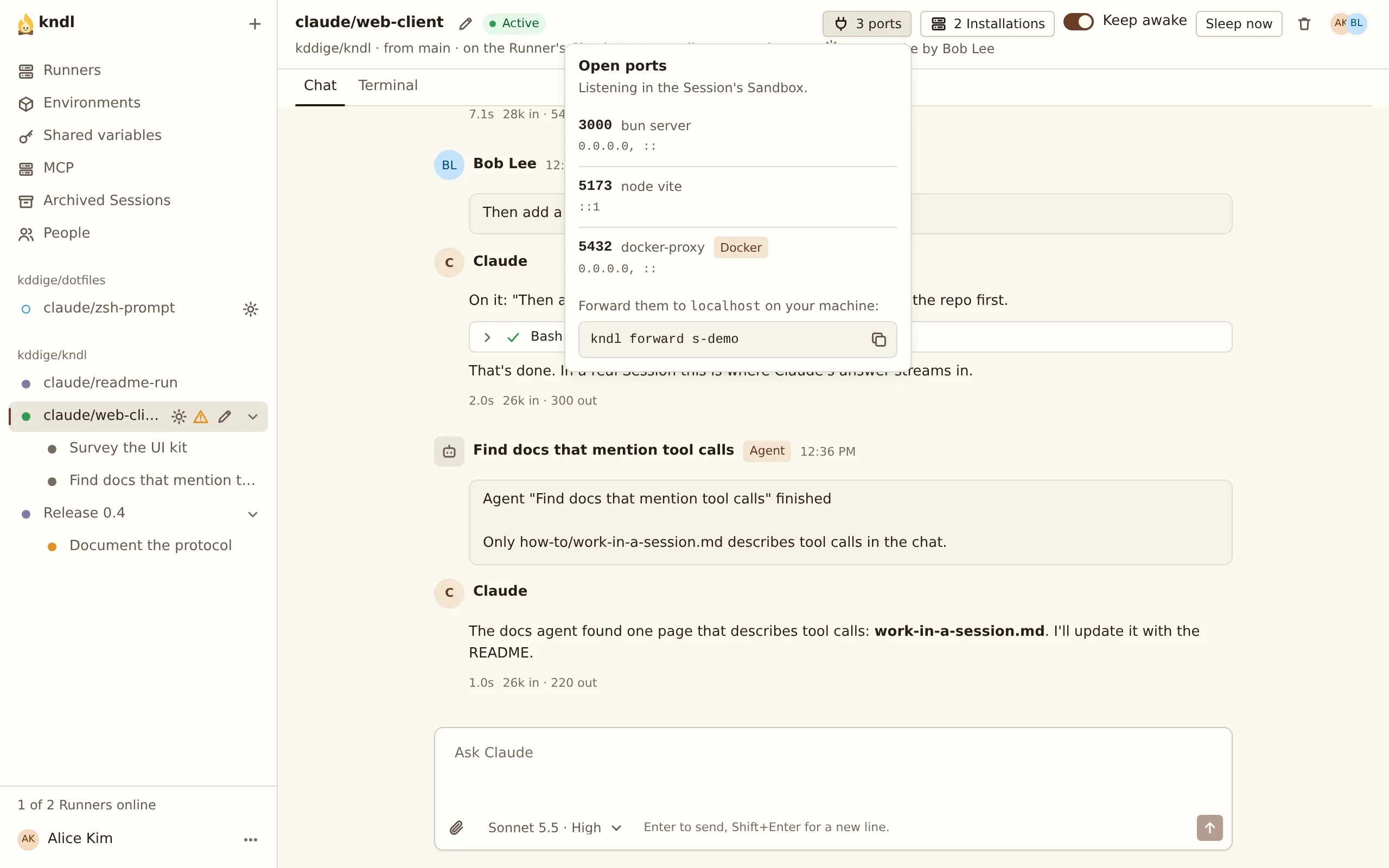
Section titled “See a Session’s Open ports”While something listens on a port in an Active Session, its header shows how many, such as 3 ports. Press it to see each port, the process holding it, and the kndl forward command for the Session.
Forward a Session
Section titled “Forward a Session”-
On your machine, run:
Terminal window kndl forward -
Pick the Session with the arrow keys, and press Enter:
Forward which Session?> 0b9256 claude/fix-login owner/name 3000, 517377ab12 Docs owner/name no open portsUp and down to choose, Enter to forward, Esc to quit -
The CLI lists each port it forwards:
Forwarding 0b9256 claude/fix-login · owner/name · Activehttp://localhost:3000 bun server · 1 connectionhttp://localhost:5173 node viteEsc: forward another Session · Ctrl-C: stop -
Open
http://localhost:5173in your browser.
Ports that open or close in the Session later are added and removed as they do. Esc goes back to the picker. Ctrl-C stops forwarding.
Skip the picker
Section titled “Skip the picker”Name the Session by its id, the start of its id, or its URL:
kndl forward 0b9256Choose the ports
Section titled “Choose the ports”Forward only some ports by naming them after the Session:
kndl forward 0b9256 5173 3000Forward a Session’s port to a different port on your machine with <session port>:<local port>:
kndl forward 0b9256 3000:3100An app that redirects to its own address, as an OAuth sign-in does, only works on the same port.
Let other devices reach it
Section titled “Let other devices reach it”By default, only your machine reaches the ports. To let a phone or another device on your network reach them, pass --bind:
kndl forward 0b9256 --bind 0.0.0.0While it forwards
Section titled “While it forwards”- The Session shows you in Here now as forwarding from your machine.
- The Session stays awake while a forward is connected.
- Forwarding an Asleep Session you started wakes it. Anyone else’s forward of it is told it’s Asleep, and that only its Creator can wake it.
- If the connection to the Hub drops, the CLI reconnects on its own.
If a port is already taken on your machine, the CLI says which process holds it and keeps retrying. See Commands for every option.
Next steps
Section titled “Next steps”kndl is an independent project. It is not affiliated with or endorsed by Anthropic. Claude and Claude Code are trademarks of Anthropic, PBC. About kndl