

Add a Runner
Connect a machine to the Hub as a Runner, so Sessions can run on it.
Each Runner connects out to the Hub, so the Hub never reaches into it. A Runner needs no Claude Code and no Claude sign-in: its Sessions run on their Creator’s Claude credential.
What you need
Section titled “What you need”- A machine with what a Runner needs: a Mac with Apple Silicon, or Linux with KVM.
- The Hub’s URL, reachable from that machine. See Reach the Hub from other machines.
Pair it from the web UI
Section titled “Pair it from the web UI”Anyone signed in can add a Runner.
-
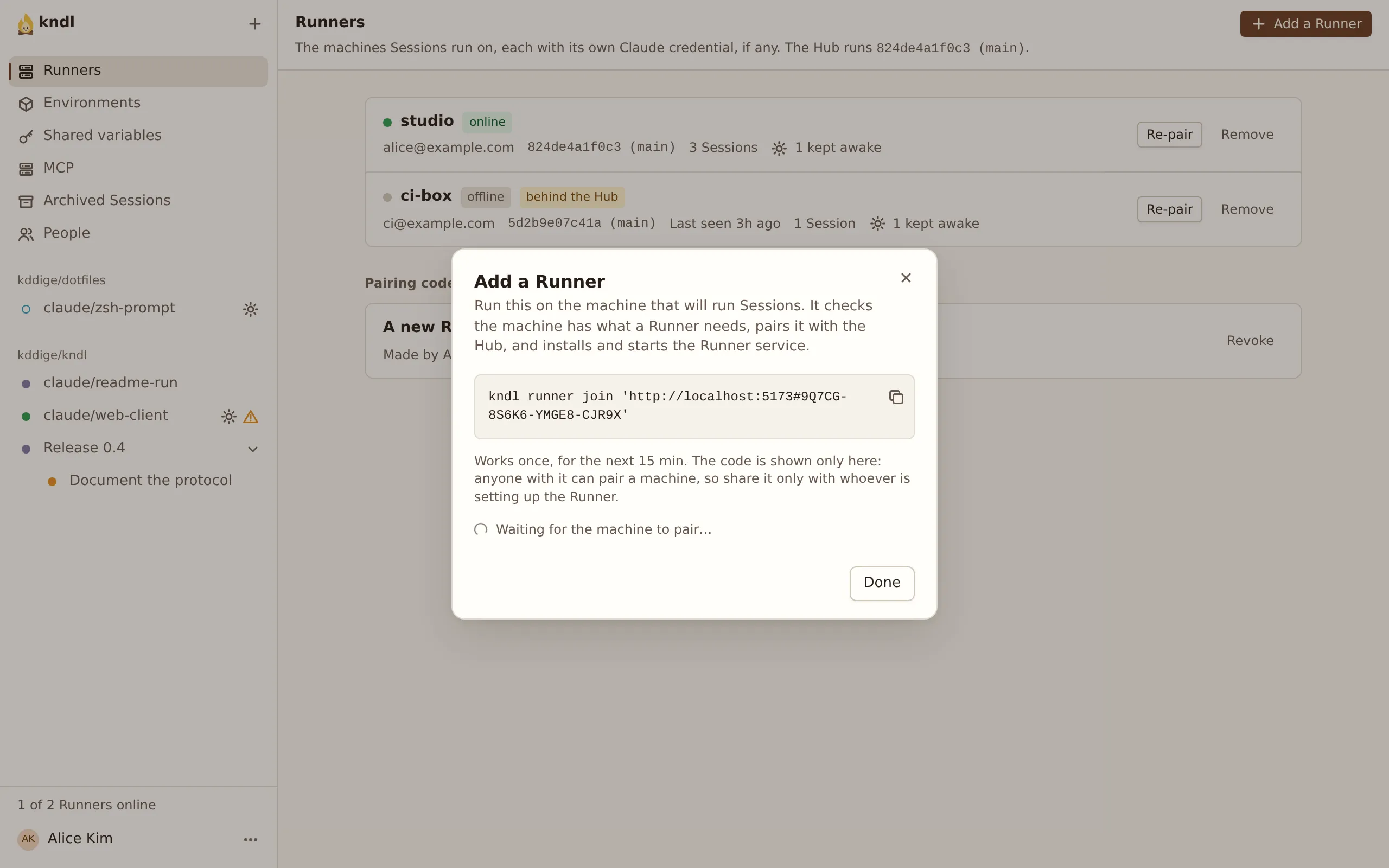
In the web UI, open Runners and press Add a Runner. Copy the command it shows.
-
On the Runner’s machine, install kndl, then paste the command:
Terminal window kndl runner join 'https://hub.example.com#7K2QD-M9XRT-4VBNC-H8PWE'It offers to install what’s missing, installs and starts the Runner’s service, and waits until it connects.
-
The dialog’s Waiting for the machine to pair… turns into Paired build-box, and the Runner shows on the Runners page.
The Runner is named after the machine’s short hostname. To name it yourself, add --name build-box. For a script, add --non-interactive.
Pairing codes
Section titled “Pairing codes”- A code works once, within 15 minutes, and is shown only once.
- Anyone with it can pair a machine, so share it only with whoever sets up the Runner.
- Pairing codes not used yet, on the Runners page, lists open codes. Revoke ends one. A Runner already paired keeps working.
- Case, dashes and spaces don’t matter, so a code read aloud works.
Pair it with a Runner token
Section titled “Pair it with a Runner token”To script it from the Hub’s machine, issue a token instead.
-
On the Hub’s machine, issue the Runner’s token. It starts with
chr_and isn’t shown again:Terminal window kndl runner token build-box -
On the Runner’s machine, install kndl and run onboard with it:
Terminal window kndl onboard --role runner --runner-name build-box \--hub-url https://hub.example.com --token chr_…
Manage Runners
Section titled “Manage Runners”The Runners page lists each Runner: online or offline, its version, and its Sessions. A Runner has no Claude credential of its own: each Session runs on its Creator’s.
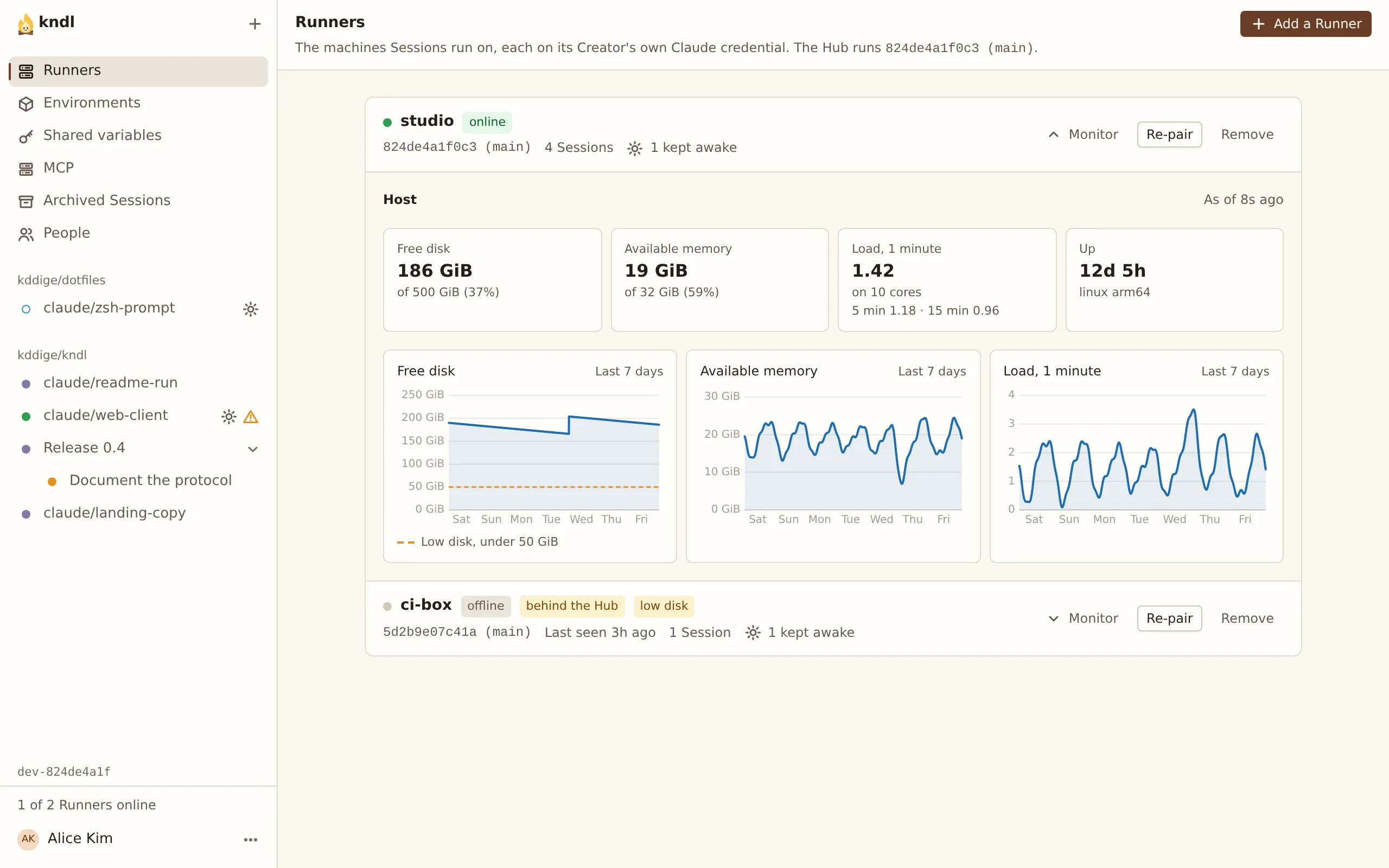
- Monitor opens the Runner’s host under its row: free disk, available memory, load and uptime as it last sampled them, and charts of the last 7 days. A row says low disk when under 10 GiB, or a tenth of the disk, is free. Sessions still start; it’s a warning.
- Re-pair makes a code for that Runner. The machine that uses it takes the Runner’s place, with its name and Sessions, and the old token stops working. Use it for a reinstalled machine or a lost token.
- Remove disconnects the Runner and revokes its token. Archive its Sessions first.
While a Runner is offline, its Sessions are Frozen. They carry on when it’s back. kndl runner stop and kndl runner start control its service, and kndl logs runner -f follows its log.
Runner names
Section titled “Runner names”A Runner’s name is its identity: its Sessions belong to the Runner of that name.
- A name the Hub has can’t be taken by a new Runner.
kndl runner joinrefuses withThe Hub already has a Runner named build-box …, and the code isn’t used up. Use Re-pair instead. - A removed Runner’s name is free again. A machine paired under it takes over the removed Runner’s Archived Sessions.
- For a clean slate, pair under a new name:
--name build-box-2.
Keep Runners on the Hub’s commit
Section titled “Keep Runners on the Hub’s commit”Runners run the Hub’s commit, and follow it when the Hub updates. A Runner behind the Hub starts and wakes no Session until it updates. See Update kndl.
Next steps
Section titled “Next steps”kndl is an independent project. It is not affiliated with or endorsed by Anthropic. Claude and Claude Code are trademarks of Anthropic, PBC. About kndl