

Set up an Environment
Give a Repo’s Sessions the tools they need, by setting up the Environment their Sandboxes are built from.
Each Repo has one Environment. A Repo needs one before its first Session, and anyone with access to the Repo on GitHub can change it.
What you need
Section titled “What you need”- Access to the Repo on GitHub, and the Hub’s GitHub App installed on it. If either is missing, the page says so: see The Environment won’t open.
Open the Environment
Section titled “Open the Environment”Press Environments in the sidebar and pick the Repo. Starting a Repo’s first Session also brings you here, and starts the Session once you apply.
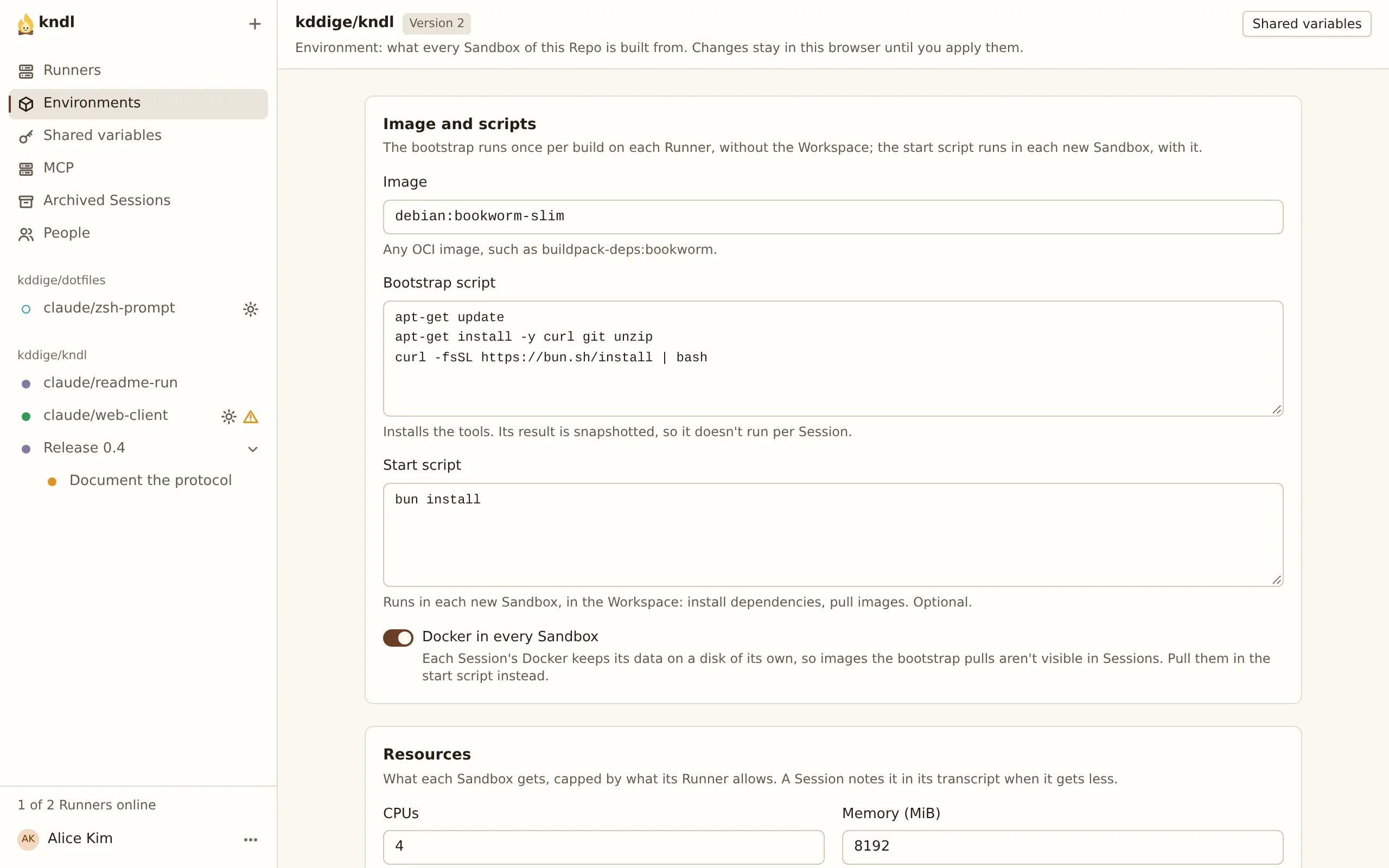
Changes are a draft in your browser until you apply them.
Choose the image
Section titled “Choose the image”Image is the OCI image every Sandbox starts from. The default, buildpack-deps:bookworm, is Debian with curl, git, a compiler and common libraries. Any Debian-like or Alpine-like image works.
Write the Bootstrap script
Section titled “Write the Bootstrap script”Bootstrap script runs once per build on each Runner, before any Workspace exists. Install what every Session needs here: language runtimes, CLIs and system packages.
Tools that add themselves to PATH in ~/.bashrc or ~/.profile, such as mise, rustup and nvm, are on PATH for Claude’s tools. For example, to install Bun through mise:
curl -fsSL https://mise.run | shecho 'eval "$(~/.local/bin/mise activate bash)"' >> ~/.bashrc~/.local/bin/mise use -g bun@latestTo let Claude use gh, install it here. On the default image:
install -d -m 0755 /etc/apt/keyringscurl -fsSL https://cli.github.com/packages/githubcli-archive-keyring.gpg -o /etc/apt/keyrings/githubcli-archive-keyring.gpgecho "deb [arch=$(dpkg --print-architecture) signed-by=/etc/apt/keyrings/githubcli-archive-keyring.gpg] https://cli.github.com/packages stable main" > /etc/apt/sources.list.d/github-cli.listapt-get update && apt-get install -y ghWrite the Start script
Section titled “Write the Start script”Start script runs in /workspace each time a Sandbox is made for a Session, but not on an ordinary wake. Use it for what depends on the Repo’s files:
bun installTurn on Docker
Section titled “Turn on Docker”Turn on Docker in every Sandbox if Sessions should run containers, such as a database for tests. Each Sandbox keeps Docker’s data on its own disk, across sleep.
Set the resources
Section titled “Set the resources”CPUs and Memory (MiB) are what each Sandbox gets. The default is 2 CPUs and 4096 MiB. A Runner may give less, and the Session’s transcript says so when it does.
Advanced: dependency folders lists folders, such as **/node_modules, that each Sandbox keeps on a fast disk of its own. The defaults cover Node, Python and Rust.
Add variables
Section titled “Add variables”Variables reach both scripts and every tool Claude runs, as environment variables. See Use variables and secrets.
Test and apply
Section titled “Test and apply”-
If you changed the image, a script, Docker, the dependency folders or a variable available at build, the draft needs a passing Test build. Pick a Runner in Runner to build on, press Test build, and watch the log. Other changes, such as resources, skip this step.
-
Press Apply. The draft becomes a new version under Version history.
New Sessions start on the latest version. Running Sessions show Environment changed: press Restart to move one to it. Restarting keeps its Workspace and conversation.
Next steps
Section titled “Next steps”kndl is an independent project. It is not affiliated with or endorsed by Anthropic. Claude and Claude Code are trademarks of Anthropic, PBC. About kndl